
Vectorless RAG - PageIndex : Learn from First Principles - No 3rd Party Libraries
Learn from First Principles

Vectorless RAG: The Concepts
Note: This tutorial was written with AI assistance and reviewed/published by a human. I use AI as a co-pilot — the I own the quality.
What Problem Does RAG Solve?
Large Language Models (LLMs) are powerful but have a knowledge cutoff. They can’t answer questions about your private documents, recent data, or domain-specific content. Retrieval-Augmented Generation (RAG) solves this by retrieving relevant content from your documents and feeding it to the LLM as context.
Traditional (Vector) RAG — How It Works
The standard approach involves:
Chunk — Split documents into small text fragments (e.g., 500 tokens each)
Embed — Convert each chunk into a vector using an embedding model
Store — Save vectors in a vector database (Pinecone, Weaveworks, ChromaDB, etc.)
Query — Convert the user’s question into a vector
Search — Find the most similar vectors via cosine similarity
Generate — Pass matching chunks to the LLM to generate an answer
The Problem: Similarity ≠ Relevance
Vector search finds text that sounds like your question, but that’s not the same as text that answers it. Consider:
Question: “What was the revenue impact of the Q3 supply chain disruption?”
A vector search might return chunks about:
“Supply chain” in the operations section (similar words, wrong context)
“Revenue” in the quarterly summary (similar words, missing the connection)
But miss the actual analysis buried in section 4.2.3 of the financial review
This is what PageIndex calls “vibe retrieval” — matching by vibes (semantic similarity) rather than reasoning.
Other Vector RAG Drawbacks
Chunking destroys structure — A table split across two chunks loses meaning
No traceability — You can’t explain why a chunk was retrieved
Tuning overhead — Chunk size, overlap, embedding model, similarity threshold all need tuning
Infrastructure cost — Vector databases add operational complexity
Vectorless RAG — The PageIndex Approach
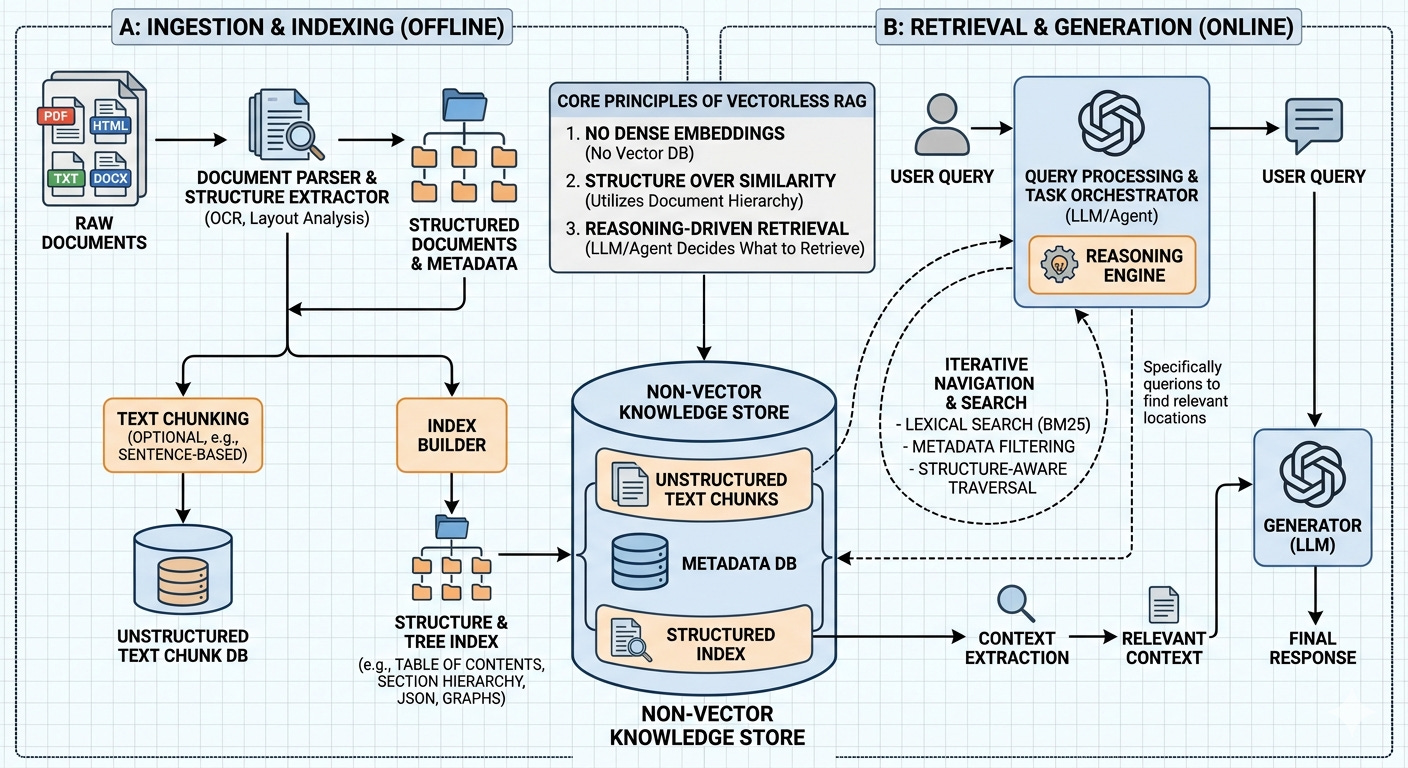
PageIndex (by VectifyAI) proposes a fundamentally different approach: No vectors. No embeddings. No chunking. Instead, it mimics how a human expert navigates a long document.
How a Human Expert Works
When a domain expert needs to find information in a 200-page report, they don’t read every page. They:
Scan the table of contents to understand the document structure
Reason about which sections are likely to contain the answer
Navigate to those specific sections
Read the relevant content
Synthesize an answer
PageIndex replicates this exact workflow using LLMs.
The Two-Phase Architecture
Phase 1: Index Construction
The document is transformed into a hierarchical tree index — think of it as a smart table of contents with summaries:
Document: "Microservices Architecture Guide"
├── 1. Introduction [pages 1-3]
│   Summary: "Defines microservices, compares with monoliths..."
│   ├── 1.1 What Are Microservices [pages 1-1]
│   ├── 1.2 Why Microservices Matter [pages 1-2]
│   └── 1.3 Monolith vs Microservices [pages 2-3]
├── 2. Core Design Principles [pages 3-6]
│   Summary: "Covers single responsibility, loose coupling, API design..."
│   ├── 2.1 Single Responsibility [pages 3-4]
│   ├── 2.2 Loose Coupling [pages 4-5]
│   └── ...
└── ...
Each node contains:
Title — The section heading
Page range — Where this section lives in the document
Summary — A concise description of the section’s content
Children — Subsections (creating the hierarchy)
The LLM generates this structure by reading the document and identifying its natural organization.
Phase 2: Reasoning-Based Retrieval
When a user asks a question:
Tree Search — The LLM receives the tree index (titles + summaries, NOT the full text) and reasons about which nodes are relevant
Context Extraction — The actual text from the selected nodes is extracted
Answer Generation — The LLM reads the extracted text and generates an answer with citations
User Question
    ↓
[LLM reads tree index]  ← titles + summaries only
    ↓
"Section 2.2 and 3.1 are relevant because..."  ← explicit reasoning
    ↓
[Extract text from sections 2.2 and 3.1]
    ↓
[LLM generates answer with page citations]
    ↓
Answer + Sources
Why This Works Better
AspectVector RAGVectorless RAGRetrievalSemantic similarity (approximate)LLM reasoning (deliberate)Document structureDestroyed by chunkingPreserved as hierarchyTraceabilityOpaque similarity scoresExplicit reasoning chainInfrastructureEmbedding model + vector DBJust an LLMTuningChunk size, overlap, thresholdMinimal
Performance
PageIndex powers Mafin 2.5, which achieved 98.7% accuracy on FinanceBench — a benchmark for financial document analysis. This significantly outperforms traditional vector-based RAG on complex, domain-specific documents.
What We Build in This Demo
This project implements both phases from scratch:
Indexer — Parses a document, sends it to an LLM, and builds the hierarchical tree index
Retriever — Accepts questions, uses LLM reasoning to navigate the tree, extracts context, and generates cited answers
Available in both JavaScript (zero dependencies) and Python (zero dependencies for markdown; pymupdf optional for PDF support). Supports multiple LLM providers: OpenAI (default), Google Gemini, Anthropic Claude, and Ollama (local).
Further Reading
The concept builds on ideas from Domain-Driven Design (hierarchical decomposition) and agentic AI (LLM-as-reasoner)
JavaScript Demo: Vectorless RAG from Scratch
Note: This tutorial was written with AI assistance and reviewed/published by a human. We use AI as a co-pilot — the human owns the quality.
Prerequisites
Node.js 18+ (for built-in
fetch-compatible APIs)An LLM API key from any supported provider (see below)
No npm packages required — this is truly zero-dependency
Supported Providers
ProviderAPI Key Env VarDefault ModelGet a KeyOpenAI (default)OPENAI_API_KEYgpt-4o-miniplatform.openai.comGoogle GeminiGEMINI_API_KEYgemini-2.0-flashaistudio.google.comAnthropic ClaudeANTHROPIC_API_KEYclaude-sonnet-4-20250514console.anthropic.comOllama (local)none neededllama3ollama.com
Project Structure
js/
├── index.js          # CLI entry point + interactive query loop
├── indexer.js        # Document parsing + hierarchical tree construction
├── retriever.js      # LLM-driven tree search + answer generation
└── sample-data/
    └── sample-doc.md # Sample document (microservices guide)
Quick Start
# Option 1: Set your API key in .env (recommended)
cp ../.env.example ../.env
# Edit ../.env and add your key

# Option 2: Or export directly
export OPENAI_API_KEY="sk-your-key-here"

# Navigate to the js directory
cd js

# Run with the sample document (uses OpenAI by default)
node index.js --file ./sample-data/sample-doc.md

# Use a different provider
node index.js --file ./sample-data/sample-doc.md --provider gemini
node index.js --file ./sample-data/sample-doc.md --provider anthropic
node index.js --file ./sample-data/sample-doc.md --provider ollama

# Override the model
node index.js --file ./sample-data/sample-doc.md --model gpt-4o
node index.js --file ./sample-data/sample-doc.md --provider gemini --model gemini-1.5-pro
How It Works — File by File
1. indexer.js — Building the Tree Index
This file does two things:
a) Parse the document into “pages”
function parseMarkdownIntoPages(filePath, linesPerPage = 40) {
  const content = fs.readFileSync(filePath, "utf-8");
  const lines = content.split("\n");
  const pages = [];

  for (let i = 0; i < lines.length; i += linesPerPage) {
    const pageLines = lines.slice(i, i + linesPerPage);
    pages.push({
      pageNumber: pages.length + 1,
      text: pageLines.join("\n"),
    });
  }
  return pages;
}
Since markdown files don’t have real “pages,” we simulate them by grouping every 40 lines into a page. This gives the LLM page references to work with. For PDFs, each physical page would be one entry.
b) Ask the LLM to build a hierarchical index
The key prompt instructs the LLM to:
Read the entire document (tagged with page markers)
Identify the natural hierarchy (sections, subsections)
Return a JSON tree with title, page range, and summary for each node
The LLM response looks like:
{
  "title": "Microservices Architecture Guide",
  "start_page": 1,
  "end_page": 8,
  "summary": "A comprehensive guide covering microservices design, communication, deployment, security, and testing.",
  "children": [
    {
      "title": "Introduction",
      "start_page": 1,
      "end_page": 2,
      "summary": "Defines microservices and compares them with monolithic architecture.",
      "children": [...]
    }
  ]
}
c) LLM API call — zero dependencies, multi-provider
Instead of using any SDK, we make raw HTTPS calls. Each provider (OpenAI, Gemini, Claude, Ollama) has its own config for endpoint, auth, request format, and response parsing — all handled by a PROVIDERS config object:
const PROVIDERS = {
  openai:    { hostname: "api.openai.com",    path: "/v1/chat/completions", ... },
  gemini:    { hostname: "generativelanguage.googleapis.com", ... },
  anthropic: { hostname: "api.anthropic.com", path: "/v1/messages", ... },
  ollama:    { hostname: "localhost",          port: 11434, ... },
};

function callLLM(apiKey, model, systemPrompt, userPrompt, provider = "openai") {
  const cfg = PROVIDERS[provider];
  // builds request body, headers, and parses response per provider
}
This means zero npm packages regardless of which provider you use.
2. retriever.js — Reasoning-Based Retrieval
This is where the magic happens. Three steps:
Step 1: Tree Search (LLM reasons over the index)
The LLM receives ONLY the tree structure (titles + summaries, not full text) and reasons about which nodes answer the question:
function buildSearchPrompt(query, tree) {
  const slimTree = stripTextFromTree(tree); // remove full text, keep summaries

  return `You are given a user question and a hierarchical tree index...
    QUESTION: ${query}
    DOCUMENT TREE: ${JSON.stringify(slimTree, null, 2)}
    ...select the most specific nodes...`;
}
The LLM responds with its reasoning:
{
  "thinking": "The question asks about testing strategies. Node 0.6 covers Testing Strategies with children for the testing pyramid, E2E testing, and performance testing.",
  "selected_nodes": ["0.6.1", "0.6.2", "0.6.3"]
}
Step 2: Context Extraction
We look up the selected nodes in the tree, find their page ranges, and extract the actual text:
function extractContext(selectedNodeIds, tree, pages) {
  // Find each node, get its page range, collect text
  for (const nodeId of selectedNodeIds) {
    const node = allNodes.find((n) => n.node_id === nodeId);
    const nodePages = pages.filter(
      (p) => p.pageNumber >= node.start_page && p.pageNumber <= node.end_page
    );
    // ...
  }
}
Step 3: Answer Generation
The extracted text is sent to the LLM with instructions to answer the question and cite sources:
{
  "answer": "The microservices testing strategy follows a pyramid model with three levels...",
  "sources": [
    {"node_id": "0.6.1", "title": "The Testing Pyramid", "pages": "6-7"}
  ]
}
3. index.js — CLI and Interactive Loop
Ties everything together:
Parses CLI arguments
Builds or loads the index
Enters an interactive query loop where you type questions and get cited answers
Running the Demo
Step 1: Build the Index
# Set your key (or use .env)
export OPENAI_API_KEY="sk-..."
cd js
node index.js --file ./sample-data/sample-doc.md
You’ll see the tree being built:
🤖 Provider: openai | Model: gpt-4o-mini

📄 Parsing document: ./sample-data/sample-doc.md
   Found 8 pages

🌳 Building hierarchical tree index via LLM (openai/gpt-4o-mini)...

📋 Document Index:
0 Microservices Architecture Guide [pages 1-8]
  → A comprehensive guide to building microservices...
  0.1 Introduction [pages 1-2]
    → Defines microservices, why they matter...
    0.1.1 What Are Microservices [pages 1-1]
    ...

💾 Index saved to: ./sample-data/sample-doc_index.json
Step 2: Ask Questions
❓ Your question: What are the main communication patterns between microservices?

🌳 Step 1: Searching tree index (LLM reasoning)...
   Thinking: The question is about communication patterns. Section 3 covers
   Communication Patterns with subsections on synchronous, asynchronous, and
   service mesh approaches.
   Selected nodes: 0.3.1, 0.3.2, 0.3.3

📖 Step 2: Extracting context from selected nodes...
   Extracted 3 sections

💡 Step 3: Generating answer from context...

──────────────────────────────────────────────────────
📝 ANSWER:
──────────────────────────────────────────────────────
The three main communication patterns are:
1. Synchronous (HTTP/REST, gRPC) — request-response...
2. Asynchronous (Kafka, RabbitMQ) — event-driven...
3. Service Mesh (Istio, Linkerd) — infrastructure layer...

📌 Sources:
   • Synchronous Communication (Pages 4-4)
   • Asynchronous Communication (Pages 4-5)
   • Service Mesh (Pages 5-5)
──────────────────────────────────────────────────────
Step 3: Reuse the Index
Skip the indexing step on subsequent runs:
node index.js --index ./sample-data/sample-doc_index.json --file ./sample-data/sample-doc.md
Try These Questions
“How does Netflix handle microservices at scale?”
“What security measures should be implemented at the API gateway?”
“Compare synchronous and asynchronous communication patterns”
“What is the strangler fig pattern?”
“How should microservices testing be structured?”
Using Your Own Documents
Point --file at any markdown or text file:
node index.js --file ~/my-report.md
node index.js --file ~/meeting-notes.txt
Switching Providers
# Google Gemini
export GEMINI_API_KEY="your-key"
node index.js --file ./sample-data/sample-doc.md --provider gemini

# Anthropic Claude
export ANTHROPIC_API_KEY="your-key"
node index.js --file ./sample-data/sample-doc.md --provider anthropic

# Ollama (local, no key needed — just run: ollama serve)
node index.js --file ./sample-data/sample-doc.md --provider ollama --model llama3
Or put all your keys in the .env file and just use --provider:
node index.js --file doc.md --provider gemini
Key Takeaway
Notice what’s NOT happening:
No embedding model
No vector database
No chunking or overlap tuning
No similarity scores
Just structured indexing + LLM reasoning. The LLM explicitly tells you why it picked each section, and every answer includes page-level citations. That’s Vectorless RAG.
Python Demo: Vectorless RAG from Scratch
Note: This tutorial was written with AI assistance and reviewed/published by a human. We use AI as a co-pilot — the human owns the quality.
Prerequisites
Python 3.10+
An LLM API key from any supported provider (see below)
No pip packages required for markdown files
Optional:
pymupdffor PDF support (pip install pymupdf)
Supported Providers
ProviderAPI Key Env VarDefault ModelGet a KeyOpenAI (default)OPENAI_API_KEYgpt-4o-miniplatform.openai.comGoogle GeminiGEMINI_API_KEYgemini-2.0-flashaistudio.google.comAnthropic ClaudeANTHROPIC_API_KEYclaude-sonnet-4-20250514console.anthropic.comOllama (local)none neededllama3ollama.com
Project Structure
python/
├── main.py           # CLI entry point + interactive query loop
├── indexer.py        # Document parsing + hierarchical tree construction
├── retriever.py      # LLM-driven tree search + answer generation
└── sample-data/
    └── sample-doc.md # Sample document (microservices guide)
Quick Start
# Option 1: Set your API key in .env (recommended)
cp ../.env.example ../.env
# Edit ../.env and add your key

# Option 2: Or export directly
export OPENAI_API_KEY="sk-your-key-here"

# Navigate to the python directory
cd python

# Run with the sample document (uses OpenAI by default)
python main.py --file ./sample-data/sample-doc.md

# Use a different provider
python main.py --file ./sample-data/sample-doc.md --provider gemini
python main.py --file ./sample-data/sample-doc.md --provider anthropic
python main.py --file ./sample-data/sample-doc.md --provider ollama

# Run with a PDF (requires: pip install pymupdf)
python main.py --file ~/Downloads/report.pdf

# Override the model
python main.py --file ./sample-data/sample-doc.md --model gpt-4o
python main.py --file ./sample-data/sample-doc.md --provider gemini --model gemini-1.5-pro
How It Works — File by File
1. indexer.py — Building the Tree Index
Document Parsing
The indexer supports two input formats:
Markdown/Text — Groups lines into simulated “pages”:
def parse_markdown_into_pages(file_path, lines_per_page=40):
    with open(file_path, "r") as f:
        lines = f.readlines()

    pages = []
    for i in range(0, len(lines), lines_per_page):
        page_lines = lines[i : i + lines_per_page]
        pages.append({"page_number": len(pages) + 1, "text": "".join(page_lines)})
    return pages
PDF — Extracts text per physical page using PyMuPDF:
def parse_pdf_into_pages(file_path):
    import pymupdf
    doc = pymupdf.open(file_path)
    pages = []
    for i, page in enumerate(doc):
        text = page.get_text()
        if text.strip():
            pages.append({"page_number": i + 1, "text": text})
    return pages
LLM Call — Zero Dependencies, Multi-Provider
Uses Python’s built-in urllib to call any provider’s API directly. Each provider (OpenAI, Gemini, Claude, Ollama) has its own config for endpoint, auth, request format, and response parsing:
PROVIDERS = {
    "openai":    {"url": "https://api.openai.com/v1/chat/completions", ...},
    "gemini":    {"url_fn": lambda model, key: f"https://.../{model}:generateContent?key={key}", ...},
    "anthropic": {"url": "https://api.anthropic.com/v1/messages", ...},
    "ollama":    {"url": "http://localhost:11434/api/chat", ...},
}

def call_llm(api_key, model, system_prompt, user_prompt, provider="openai"):
    cfg = PROVIDERS[provider]
    # builds request body, headers, and parses response per provider
This means zero pip packages regardless of which provider you use (except pymupdf for PDF parsing).
Tree Construction
The LLM receives the full document (tagged with page markers) and returns a hierarchical JSON tree:
def build_index(file_path, api_key, model="gpt-4o-mini"):
    pages = parse_document(file_path)
    response = call_llm(api_key, model, SYSTEM_PROMPT, build_index_prompt(pages))
    tree = json.loads(response)
    assign_node_ids(tree)  # Add IDs like "0", "0.1", "0.1.1"
    return {"tree": tree, "pages": pages, ...}
2. retriever.py — Reasoning-Based Retrieval
Three-step pipeline:
Step 1: Tree Search
The LLM receives only the tree structure (titles + summaries) and reasons about relevance:
def search_tree(query, tree, api_key, model):
    response = call_llm(
        api_key, model,
        "You are a document retrieval assistant.",
        build_search_prompt(query, tree),
    )
    return json.loads(response)
    # Returns: {"thinking": "...", "selected_nodes": ["0.3.1", "0.3.2"]}
Step 2: Context Extraction
Extract actual text from the pages covered by selected nodes:
def extract_context(selected_node_ids, tree, pages):
    all_nodes = collect_all_nodes(tree)
    for node_id in selected_node_ids:
        node = next(n for n in all_nodes if n["node_id"] == node_id)
        node_pages = [p for p in pages
                      if node["start_page"] <= p["page_number"] <= node["end_page"]]
        text = "\n\n".join(p["text"] for p in node_pages)
        # ...
Step 3: Answer Generation
The LLM reads the extracted text and generates a cited answer:
def generate_answer(query, contexts, api_key, model):
    response = call_llm(api_key, model, "...", build_answer_prompt(query, contexts))
    return json.loads(response)
    # Returns: {"answer": "...", "sources": [{"title": "...", "pages": "..."}]}
3. main.py — CLI Entry Point
Uses argparse for CLI handling, then enters an interactive loop:
python main.py --file ./sample-data/sample-doc.md
Commands in the interactive loop:
Type a question → get a cited answer
tree→ view the document indexquit→ exit
Running the Demo
With Markdown (zero dependencies)
# Set your key (or use .env)
export OPENAI_API_KEY="sk-..."
cd python
python main.py --file ./sample-data/sample-doc.md
With PDF
pip install pymupdf
python main.py --file ~/Downloads/annual-report.pdf
Sample Session
🤖 Provider: openai | Model: gpt-4o-mini

📄 Parsing document: ./sample-data/sample-doc.md
   Found 8 pages

🌳 Building hierarchical tree index via LLM (openai/gpt-4o-mini)...

📋 Document Index:
0 Microservices Architecture Guide [pages 1-8]
  → Comprehensive guide covering design, deployment, security...
  0.1 Introduction [pages 1-2]
    ...
  0.5 Security Considerations [pages 5-6]
    0.5.1 Authentication and Authorization [pages 5-6]
    ...

❓ Your question: How should secrets be managed in microservices?

🌳 Step 1: Searching tree index (LLM reasoning)...
   Thinking: This question is about secrets management, which falls under
   security. Node 0.5.3 "Data Protection" covers secrets management,
   encryption, and tools like HashiCorp Vault.
   Selected nodes: 0.5.3

📖 Step 2: Extracting context from selected nodes...
   Extracted 1 section (Data Protection)

💡 Step 3: Generating answer from context...

──────────────────────────────────────────────────────
📝 ANSWER:
──────────────────────────────────────────────────────
Secrets in microservices should never be stored in code or plain-text
environment variables. Instead, use dedicated tools like HashiCorp Vault,
AWS Secrets Manager, or Kubernetes Secrets (with encryption at rest).
These tools provide secure storage and automatic rotation of database
passwords, API keys, and certificates.

📌 Sources:
   • Data Protection (Pages 6-6)
──────────────────────────────────────────────────────
Try These Questions
“What is the strangler fig pattern?”
“How does Uber organize its microservices?”
“What are the three pillars of observability?”
“Compare REST, gRPC, and GraphQL for microservices”
“What testing approach works best for microservices?”
Using Your Own Documents
# Markdown or text files
python main.py --file ~/notes/architecture-decisions.md

# PDF files (pip install pymupdf)
python main.py --file ~/Documents/whitepaper.pdf

# With a stronger model
python main.py --file ~/report.pdf --model gpt-4o
Key Takeaway
The Python implementation is functionally identical to the JavaScript version, with one bonus: PDF support. The core algorithm is the same — build a hierarchical tree, let the LLM reason over it, extract context from the selected nodes, and generate a cited answer.
No vectors. No embeddings. No chunking. Just structured indexing + LLM reasoning.
Source code
You can use your own Open AI/Gemini/ Anthropic Claude/ Ollama key
https://github.com/rajeshpillai/ai-examples/tree/main/vectorless-rag-pageindex