
WASM By Hand - Part 04 - Your First Function
Write your very own function using WASM

📍 You are here: Chapter 04 - First Code Example
⏱️ Time to Complete: 20-25 minutes
📚 Prerequisites: Completed Chapters 01-03 (Theory + Setup)
🎯 Learning Objectives:
Write your first WebAssembly function by hand
Understand function parameters and return values
Master the stack-based execution model with real examples
Export functions for JavaScript to call
Run the same code in Node.js and browsers
What We’re Building
We’ll create a WebAssembly module that adds two numbers together. This simple example teaches the fundamental mechanics of WebAssembly functions.
Input: Two 32-bit integers
Output: Their sum
Example: add(5, 7) → 12
Why Start with Addition?
Simple but complete: Addition is easy to understand, yet it demonstrates:
Function definition
Parameters
Return values
Stack operations
Exports
Host integration
Real-world relevance: The same patterns you learn here apply to complex functions in production WebAssembly applications.
The Complete WAT Code
File: code/04-first-function/add.wat
(module
  (func $add (param i32 i32) (result i32)
    local.get 0
    local.get 1
    i32.add
  )
  (export “add” (func $add))
)
That’s it! Just 8 lines of code. Let’s break it down.
Code Walkthrough
1. Module Declaration
(module
  ...
)
Every WebAssembly program is a module. Think of it like a JavaScript module or a Python file - it’s a container for code.
Key points:
All WebAssembly code lives inside
(module ...)A module can contain functions, memory, globals, and more
One
.watfile = one module
2. Function Definition
(func $add (param i32 i32) (result i32)
  ...
)
Let’s break this down piece by piece:
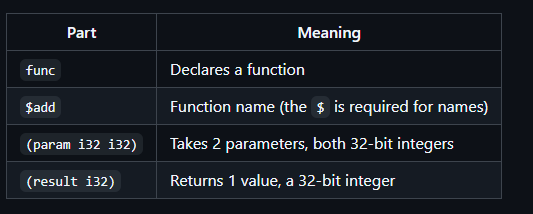
Comparison with JavaScript:
// JavaScript equivalent
function add(a, b) {  // Parameters inferred as numbers
  return a + b;       // Return type inferred
}
WebAssembly difference: Types are explicit and required. No type inference!
3. Function Body (The Stack Magic!)
local.get 0
local.get 1
i32.add
This is where WebAssembly’s stack machine model shines. Let’s see it in action with actual values.
Example call: add(5, 7)
Step-by-Step Execution
Initial state:
Parameters: param[0] = 5, param[1] = 7
Stack: []
Step 1: local.get 0
Action: Push parameter 0 onto stack
Stack:
┌─────┐
│  5  │ ← Top
└─────┘
Step 2: local.get 1
Action: Push parameter 1 onto stack
Stack:
┌─────┐
│  7  │ ← Top
├─────┤
│  5  │
└─────┘
Step 3: i32.add
Action: Pop two values, add them, push result
Before:          After:
┌─────┐         ┌─────┐
│  7  │ ← Pop   │ 12  │ ← Push (5+7)
├─────┤         └─────┘
│  5  │ ← Pop
└─────┘

Result: 12 (stays on stack as return value)
Final state:
Stack: [12]
Return value: 12 (top of stack)
Key insight: The value left on the stack becomes the return value!
4. Export Declaration
(export “add” (func $add))This is crucial! Without this line, JavaScript cannot call your function.
What it does:
Makes the internal function
$addavailable to the host (JavaScript)Gives it the external name
"add"(no$in the export name)Creates a bridge between WebAssembly and JavaScript
Analogy: Like making a function public in Java or exporting it in JavaScript:
// JavaScript equivalent
export function add(a, b) {
  return a + b;
}
Comparison: WebAssembly vs JavaScript
Let’s see the same functionality in both languages:
JavaScript Version
function add(a, b) {
  return a + b;
}

console.log(add(5, 7));  // 12
Characteristics:
✅ Concise and readable
✅ Type inference (no type declarations needed)
❌ Slower execution (interpreted/JIT)
❌ No guaranteed type safety
WebAssembly Version
(module
  (func $add (param i32 i32) (result i32)
    local.get 0
    local.get 1
    i32.add
  )
  (export “add” (func $add))
)
Characteristics:
✅ Fast execution (pre-compiled binary)
✅ Type safety (types checked at compile time)
✅ Predictable performance
❌ More verbose
❌ Lower-level (manual stack management)
When to use which:
JavaScript: UI logic, DOM manipulation, general web development
WebAssembly: Performance-critical computations, porting C/C++/Rust code
Running the Example
Step 1: Compile the WAT File
cd code/04-first-function
wat2wasm add.wat -o add.wasm
What happens:
add.wat(text) →add.wasm(binary)The binary is what actually runs
Size: ~41 bytes (tiny!)
Verify compilation:
ls -lh add.wasm
# Should show: add.wasm (41 bytes)
Step 2: Run in Node.js
File: node-runner.js
const fs = require(”fs”);

(async () => {
  // 1. Read the compiled WASM file
  const wasm = fs.readFileSync(”add.wasm”);

  // 2. Instantiate the WebAssembly module
  const { instance } = await WebAssembly.instantiate(wasm);

  // 3. Call the exported function
  const result = instance.exports.add(5, 7);

  // 4. Display the result
  console.log(”Node: “ + result);
})();
Run it:
node node-runner.jsExpected output:
Node: 12
What’s happening:
Node.js reads the binary
.wasmfileWebAssembly.instantiate()loads it into memoryinstance.exports.addcalls your WebAssembly functionThe result (12) is returned to JavaScript
Step 3: Run in Browser
File: index.html (simplified)
<!DOCTYPE html>
<html>
<head>
  <title>WebAssembly Add Example</title>
</head>
<body>
  <h1>WebAssembly: Add Two Numbers</h1>
  <button id=”btn”>Add 5 + 7</button>
  <pre id=”out”></pre>
  <script src=”browser.js”></script>
</body>
</html>
File: browser.js
async function loadWasm() {
  const response = await fetch(”add.wasm”);
  const bytes = await response.arrayBuffer();
  const { instance } = await WebAssembly.instantiate(bytes);
  return instance;
}

document.getElementById(”btn”).onclick = async () => {
  const wasm = await loadWasm();
  const result = wasm.exports.add(5, 7);
  document.getElementById(”out”).textContent = “Browser: “ + result;
};
Run it:
# From project root
npx serve .

# Open http://localhost:3000/code/04-first-function/index.html
Click the button → See: Browser: 12
Key point: The exact same add.wasm file runs in both Node.js and the browser!
Practice Exercises
Exercise 1: Subtraction
Modify the code to subtract instead of add.
HintChange `i32.add` to `i32.sub`. Remember: order matters! `5 - 7 = -2`Solution
(module
  (func $subtract (param i32 i32) (result i32)
    local.get 0
    local.get 1
    i32.sub  ;; Changed from i32.add
  )
  (export “subtract” (func $subtract))
)
JavaScript:
const result = instance.exports.subtract(10, 3);
console.log(result);  // 7
Exercise 2: Multiplication
Create a function that multiplies two numbers.
Solution
(module
  (func $multiply (param i32 i32) (result i32)
    local.get 0
    local.get 1
    i32.mul  ;; Multiplication instruction
  )
  (export “multiply” (func $multiply))
)
Test:
instance.exports.multiply(6, 7); // 42Exercise 3: Three Numbers
Add three numbers together (requires two additions).
HintAdd the first two, then add the third to the result. You’ll need three `local.get` and two `i32.add`.Solution
(module
  (func $addThree (param i32 i32 i32) (result i32)
    local.get 0
    local.get 1
    i32.add      ;; Add first two
    local.get 2
    i32.add      ;; Add third to result
  )
  (export “addThree” (func $addThree))
)
Stack trace for addThree(2, 3, 4):
Step 1: local.get 0  → Stack: [2]
Step 2: local.get 1  → Stack: [2, 3]
Step 3: i32.add      → Stack: [5]      (2+3)
Step 4: local.get 2  → Stack: [5, 4]
Step 5: i32.add      → Stack: [9]      (5+4)
Test:
instance.exports.addThree(2, 3, 4); // 9Exercise 4: Average of Two Numbers
Calculate the average of two numbers (add them, then divide by 2).
HintUse `i32.add` then `i32.const 2` then `i32.div_s` (signed division).Solution
(module
  (func $average (param i32 i32) (result i32)
    local.get 0
    local.get 1
    i32.add      ;; Add the two numbers
    i32.const 2  ;; Push constant 2
    i32.div_s    ;; Divide by 2 (signed)
  )
  (export “average” (func $average))
)
Stack trace for average(10, 20):
Step 1: local.get 0  → Stack: [10]
Step 2: local.get 1  → Stack: [10, 20]
Step 3: i32.add      → Stack: [30]
Step 4: i32.const 2  → Stack: [30, 2]
Step 5: i32.div_s    → Stack: [15]
Test:
instance.exports.average(10, 20);  // 15
instance.exports.average(7, 9);    // 8 (integer division)
Common Mistakes & Troubleshooting
❌ Mistake #1: Forgetting to Export
Wrong:
(module
  (func $add (param i32 i32) (result i32)
    local.get 0
    local.get 1
    i32.add
  )
  ;; Missing export!
)
Error in JavaScript:
TypeError: instance.exports.add is not a function
Fix: Add the export:
(export “add” (func $add))❌ Mistake #2: Wrong Parameter Count
JavaScript call:
instance.exports.add(5); // Only 1 argument!Error:
TypeError: Wasm function expects 2 arguments, got 1
Fix: Provide exactly 2 arguments:
instance.exports.add(5, 7); // ✅ Correct❌ Mistake #3: Type Confusion
JavaScript call:
instance.exports.add(5.7, 3.2); // Floats!Result: 8 (not 8.9)
Why: WebAssembly truncates floats to integers for i32 parameters.
Fix: Use correct types or convert in JavaScript:
Math.floor(5.7) + Math.floor(3.2); // Explicit truncation❌ Mistake #4: Stack Imbalance
Wrong:
(func $broken (param i32 i32) (result i32)
  local.get 0
  ;; Missing local.get 1!
  i32.add  ;; ERROR: Only 1 value on stack, need 2
)
Compilation error:
type mismatch: expected i32 but stack is empty
Fix: Ensure stack has correct number of values:
local.get 0
local.get 1  ;; ✅ Now stack has 2 values
i32.add
❌ Mistake #5: File Path Issues (Browser)
Error:
Failed to fetch add.wasm
Causes:
Not running a local server (using
file://protocol)Wrong path in
fetch()
Fix:
# Start server from project root
npx serve .

# Then open:
# http://localhost:3000/code/04-first-function/index.html
Learning Checkpoint
Test your understanding:
Question 1: What does this code return?
(func $mystery (param i32 i32) (result i32)
  local.get 1
  local.get 0
  i32.sub
)
Called with: mystery(10, 3)
Answer
Answer: -7
Explanation:
Step 1: local.get 1  → Stack: [3]
Step 2: local.get 0  → Stack: [3, 10]
Step 3: i32.sub      → Stack: [-7]  (3 - 10 = -7)
Note: Order matters! It’s param1 - param0, not param0 - param1.
Question 2: What’s wrong with this export?
(export “add” (func add))Answer
Error: Missing $ in function reference.
Correct:
(export “add” (func $add))Inside the module, function names need the $ prefix. Only the export name (the string) doesn’t use $.
Question 3: How many values are on the stack after this?
local.get 0
local.get 1
i32.add
local.get 2
Answer
Answer: 2 values
Trace:
Step 1: local.get 0  → Stack: [a]
Step 2: local.get 1  → Stack: [a, b]
Step 3: i32.add      → Stack: [a+b]      (2 values popped, 1 pushed)
Step 4: local.get 2  → Stack: [a+b, c]   (1 value pushed)
Final stack has 2 values: the sum of first two params, and the third param.
Question 4: Can you call a WebAssembly function from another WebAssembly function?
Answer
Answer: Yes! Use the call instruction.
Example:
(module
  (func $add (param i32 i32) (result i32)
    local.get 0
    local.get 1
    i32.add
  )

  (func $addTwice (param i32 i32) (result i32)
    local.get 0
    local.get 1
    call $add    ;; Call the add function
    i32.const 2
    i32.mul      ;; Multiply result by 2
  )

  (export “addTwice” (func $addTwice))
)
addTwice(3, 4) → (3 + 4) * 2 → 14
✅ Chapter Summary
Key Takeaways:
WebAssembly functions are explicit - All types must be declared
Stack-based execution - Values are pushed/popped from a stack
Exports create bridges - Without exports, JavaScript can’t call functions
Same binary, multiple hosts - One
.wasmruns in Node.js, browsers, and moreType safety at compile time - Errors caught before runtime
Parameters are 0-indexed - Access with
local.get 0,local.get 1, etc.Return value = top of stack - Whatever’s left on the stack is returned
You can now:
✅ Write basic WebAssembly functions
✅ Understand stack-based execution
✅ Export functions for JavaScript
✅ Run WebAssembly in Node.js and browsers
✅ Debug common mistakes
🔜 Next Steps
You’ve mastered basic functions! Next, we’ll explore linear memory - WebAssembly’s way of working with larger data structures like arrays and strings.
📚 Additional Resources
Previous: 03 TheSetup
Superb walkthrough of stack operations. The step-by-step visuals showing param pushing and popping make the execution model click in a way most docs skip. I ended up building a similar add function last year and didnt realize until prodiction that floating point inputs would truncate silently, which caused a weird edge case bug. The explicit typing thing is actually a feature once you stop fighting it.