
WASM By Hand - Part 05 - Memory
It's all about memory (Linear Memory)

📍 You are here: Chapter 05 - Linear Memory
⏱️ Time to Complete: 25-30 minutes
📚 Prerequisites: Completed Chapter 04 (Your First Function)
🎯 Learning Objectives:
Understand WebAssembly’s linear memory model
Learn to allocate and export memory
Master memory read/write operations (
i32.store,i32.load)Understand memory addressing and byte offsets
Share memory between WebAssembly and JavaScript
Work with different data sizes (bytes, words, etc.)
What We’re Building
A WebAssembly module that can read and write 32-bit integers to memory - the foundation for working with arrays, strings, and complex data structures.
Capabilities:
✅ Allocate 64KB of linear memory
✅ Write integers to specific memory addresses
✅ Read integers from specific memory addresses
✅ Share memory with JavaScript (zero-copy!)
Why Memory Matters
Beyond simple functions: While Chapter 04 showed how to add two numbers, real applications need to:
Process arrays of data
Handle strings
Work with complex data structures
Share large datasets with JavaScript
Linear memory is the solution - a shared, byte-addressable array that both WebAssembly and JavaScript can access.
Real-world use cases:
Image processing (pixel arrays)
Audio processing (sample buffers)
Game engines (world state, physics data)
Data analysis (large datasets)
Understanding Linear Memory
What is Linear Memory?
Think of linear memory as a giant array of bytes:
┌─────────────────────────────────────────────────────┐
│  Byte 0  │  Byte 1  │  Byte 2  │  ...  │  Byte 65535 │
└─────────────────────────────────────────────────────┘
   Address 0   Address 1  Address 2          Address 65535

Total: 64KB (65,536 bytes) = 1 page
Key characteristics:
Contiguous: One continuous block of memory
Byte-addressable: Each byte has a unique address (0, 1, 2, ...)
Resizable: Can grow in 64KB pages
Shared: Both WebAssembly and JavaScript can access it
Zero-initialized: All bytes start at 0
Memory Pages
WebAssembly memory is measured in pages:
1 page = 64KB = 65,536 bytes
Initial size: Specified when declaring memory
Maximum size: Optional limit
Growth: Can grow dynamically with
memory.grow
Example sizes:
1 page  = 64 KB   = 65,536 bytes
2 pages = 128 KB  = 131,072 bytes
10 pages = 640 KB = 655,360 bytes
The Complete WAT Code
File: code/05-memory/memory.wat
(module
  (memory (export “memory”) 1)

  (func (export “write_i32”) (param $addr i32) (param $val i32)
    local.get $addr
    local.get $val
    i32.store
  )

  (func (export “read_i32”) (param $addr i32) (result i32)
    local.get $addr
    i32.load
  )
)
Just 15 lines! But it unlocks powerful memory operations.
Code Walkthrough
1. Memory Declaration
(memory (export “memory”) 1)Let’s break this down:
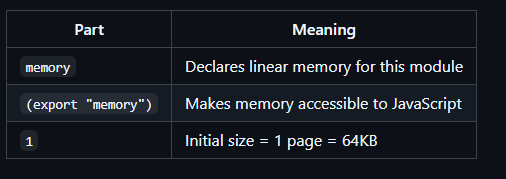
Without export:
(memory 1) ;; WebAssembly can use it, but JavaScript cannot access itWith export:
(memory (export “memory”) 1) ;; ✅ Both can access itComparison with JavaScript:
// JavaScript equivalent
const memory = new WebAssembly.Memory({ initial: 1 });
// Creates 64KB of memory
2. Write Function - Storing Data
(func (export “write_i32”) (param $addr i32) (param $val i32)
  local.get $addr
  local.get $val
  i32.store
)
What it does: Writes a 32-bit integer to memory at a specific address.
Parameters:
$addr- Memory address (where to write)$val- Value to write (what to write)
Step-by-Step Execution
Example call: write_i32(0, 123456)
Step 1: local.get $addr
Action: Push address onto stack
Stack:
┌──────┐
│  0   │ ← Address
└──────┘
Step 2: local.get $val
Action: Push value onto stack
Stack:
┌─────────┐
│ 123456  │ ← Value
├─────────┤
│   0     │ ← Address
└─────────┘
Step 3: i32.store
Action: Pop address and value, write to memory

Before:              After:
Stack:               Stack:
┌─────────┐         ┌─────┐
│ 123456  │ ← Pop   │     │ (empty)
├─────────┤         └─────┘
│   0     │ ← Pop
└─────────┘         Memory[0..3] = 123456 (4 bytes written)
Memory after write:
Address:  0    1    2    3    4    5    6    7
         ┌────┬────┬────┬────┬────┬────┬────┬────┐
Bytes:   │ 40 │ E2 │ 01 │ 00 │ 00 │ 00 │ 00 │ 00 │
         └────┴────┴────┴────┴────┴────┴────┴────┘
          └──── 123456 (little-endian) ────┘
Why little-endian?
123456 in hex = 0x0001E240
Little-endian stores least significant byte first:
Byte 0: 0x40 (least significant)
Byte 1: 0xE2
Byte 2: 0x01
Byte 3: 0x00 (most significant)
3. Read Function - Loading Data
(func (export “read_i32”) (param $addr i32) (result i32)
  local.get $addr
  i32.load
)
What it does: Reads a 32-bit integer from memory at a specific address.
Parameter:
$addr- Memory address (where to read from)
Return value:
The 32-bit integer stored at that address
Step-by-Step Execution
Example call: read_i32(0) (after writing 123456)
Step 1: local.get $addr
Action: Push address onto stack
Stack:
┌──────┐
│  0   │ ← Address
└──────┘
Step 2: i32.load
Action: Pop address, read 4 bytes from memory, push value

Before:              After:
Stack:               Stack:
┌──────┐            ┌─────────┐
│  0   │ ← Pop      │ 123456  │ ← Loaded value
└──────┘            └─────────┘

Memory[0..3] read → 123456
Result: 123456 (returned to caller)
Memory Layout Deep Dive
Storing Different Values
Let’s see how multiple values are stored:
write_i32(0, 100);    // Write 100 at address 0
write_i32(4, 200);    // Write 200 at address 4
write_i32(8, 300);    // Write 300 at address 8
Memory layout:
Address:  0    1    2    3    4    5    6    7    8    9   10   11
         ┌────┬────┬────┬────┬────┬────┬────┬────┬────┬────┬────┬────┐
Bytes:   │ 64 │ 00 │ 00 │ 00 │ C8 │ 00 │ 00 │ 00 │ 2C │ 01 │ 00 │ 00 │
         └────┴────┴────┴────┴────┴────┴────┴────┴────┴────┴────┴────┘
          └──── 100 ────┘  └──── 200 ────┘  └──── 300 ────┘
Why addresses 0, 4, 8?
Each
i32takes 4 bytesAddresses must not overlap
Aligned addresses (divisible by 4) are faster
Alignment and Performance
Aligned access (fast):
i32 at address 0  ✅ (0 ÷ 4 = 0, no remainder)
i32 at address 4  ✅ (4 ÷ 4 = 1, no remainder)
i32 at address 8  ✅ (8 ÷ 4 = 2, no remainder)
Misaligned access (slower):
i32 at address 1  ⚠️ (1 ÷ 4 = 0 remainder 1)
i32 at address 3  ⚠️ (3 ÷ 4 = 0 remainder 3)
i32 at address 7  ⚠️ (7 ÷ 4 = 1 remainder 3)
Alignment rules:
i32(4 bytes): Align to 4-byte boundaries (0, 4, 8, 12, ...)i64(8 bytes): Align to 8-byte boundaries (0, 8, 16, 24, ...)i16(2 bytes): Align to 2-byte boundaries (0, 2, 4, 6, ...)i8(1 byte): No alignment needed (any address works)
JavaScript Integration
Accessing Memory from JavaScript
Once memory is exported, JavaScript can access it directly:
const { instance } = await WebAssembly.instantiate(wasm);

// Get the exported memory object
const memory = instance.exports.memory;

// Create typed array views
const bytes = new Uint8Array(memory.buffer);    // View as bytes
const int32s = new Int32Array(memory.buffer);   // View as i32s
const floats = new Float32Array(memory.buffer); // View as f32s
Writing from JavaScript
// Method 1: Use WebAssembly function
instance.exports.write_i32(0, 999);

// Method 2: Write directly to typed array
int32s[0] = 999;  // Same as write_i32(0, 999)

// Method 3: Write individual bytes
bytes[0] = 0xE7;
bytes[1] = 0x03;
bytes[2] = 0x00;
bytes[3] = 0x00;  // 999 in little-endian
Reading from JavaScript
// Method 1: Use WebAssembly function
const value = instance.exports.read_i32(0);

// Method 2: Read directly from typed array
const value = int32s[0];  // Same as read_i32(0)

console.log(value);  // 999
Zero-Copy Sharing
The magic: Memory is shared, not copied!
// Write from WebAssembly
instance.exports.write_i32(0, 42);

// Read from JavaScript (no copying!)
console.log(int32s[0]);  // 42

// Write from JavaScript
int32s[1] = 100;

// Read from WebAssembly (no copying!)
const val = instance.exports.read_i32(4);
console.log(val);  // 100
Benefits:
⚡ Fast: No data copying between WASM and JS
💾 Efficient: Single memory buffer, not duplicated
🔄 Bidirectional: Changes visible in both directions
Running the Example
Compile
cd code/05-memory
wat2wasm memory.wat -o memory.wasm
Run in Node.js
File: node-runner.js
const fs = require(”fs”);

(async () => {
  const wasm = fs.readFileSync(”memory.wasm”);
  const { instance } = await WebAssembly.instantiate(wasm);

  // Write value to memory
  instance.exports.write_i32(0, 123456);
  console.log(”Wrote 123456 to address 0”);

  // Read value from memory
  const value = instance.exports.read_i32(0);
  console.log(”Read from address 0: “ + value);

  // Access memory directly from JavaScript
  const memory = instance.exports.memory;
  const int32s = new Int32Array(memory.buffer);
  console.log(”Direct JS access: “ + int32s[0]);
})();
Run:
node node-runner.jsExpected output:
Wrote 123456 to address 0
Read from address 0: 123456
Direct JS access: 123456
Memory Instructions Reference
Store Instructions
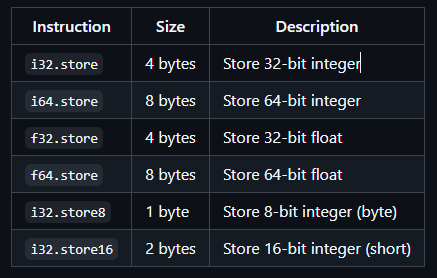
Load Instructions
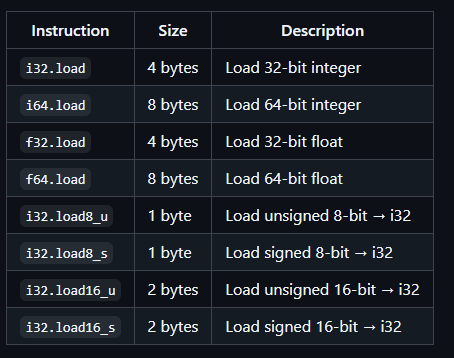
Signed vs Unsigned:
_u(unsigned): 0-255 for 8-bit, 0-65535 for 16-bit_s(signed): -128 to 127 for 8-bit, -32768 to 32767 for 16-bit
Practice Exercises
Exercise 1: Store Multiple Values
Write a function that stores three values at addresses 0, 4, and 8.
Solution
(module
  (memory (export “memory”) 1)

  (func (export “storeThree”) (param $a i32) (param $b i32) (param $c i32)
    ;; Store first value at address 0
    i32.const 0
    local.get $a
    i32.store

    ;; Store second value at address 4
    i32.const 4
    local.get $b
    i32.store

    ;; Store third value at address 8
    i32.const 8
    local.get $c
    i32.store
  )
)
Test:
instance.exports.storeThree(100, 200, 300);
const int32s = new Int32Array(instance.exports.memory.buffer);
console.log(int32s[0], int32s[1], int32s[2]);  // 100 200 300
Exercise 2: Sum Array
Write a function that sums three integers stored in memory.
HintLoad from addresses 0, 4, and 8, then add them together.Solution
(module
  (memory (export “memory”) 1)

  (func (export “sumThree”) (result i32)
    ;; Load and add all three values
    i32.const 0
    i32.load      ;; Load from address 0

    i32.const 4
    i32.load      ;; Load from address 4
    i32.add       ;; Add first two

    i32.const 8
    i32.load      ;; Load from address 8
    i32.add       ;; Add third
  )
)
Stack trace:
Step 1: i32.const 0  → [0]
Step 2: i32.load     → [100]        (loaded from memory[0])
Step 3: i32.const 4  → [100, 4]
Step 4: i32.load     → [100, 200]   (loaded from memory[4])
Step 5: i32.add      → [300]        (100 + 200)
Step 6: i32.const 8  → [300, 8]
Step 7: i32.load     → [300, 300]   (loaded from memory[8])
Step 8: i32.add      → [600]        (300 + 300)
Test:
// First store values
instance.exports.write_i32(0, 100);
instance.exports.write_i32(4, 200);
instance.exports.write_i32(8, 300);

// Then sum them
const sum = instance.exports.sumThree();
console.log(sum);  // 600
Exercise 3: Byte Operations
Store individual bytes using i32.store8.
Solution
(module
  (memory (export “memory”) 1)

  (func (export “storeBytes”) (param $addr i32) (param $b1 i32) (param $b2 i32) (param $b3 i32) (param $b4 i32)
    ;; Store 4 bytes starting at $addr
    local.get $addr
    local.get $b1
    i32.store8        ;; Store byte at addr

    local.get $addr
    i32.const 1
    i32.add
    local.get $b2
    i32.store8        ;; Store byte at addr+1

    local.get $addr
    i32.const 2
    i32.add
    local.get $b3
    i32.store8        ;; Store byte at addr+2

    local.get $addr
    i32.const 3
    i32.add
    local.get $b4
    i32.store8        ;; Store byte at addr+3
  )
)
Test:
// Store bytes 0x41, 0x42, 0x43, 0x44 (’A’, ‘B’, ‘C’, ‘D’ in ASCII)
instance.exports.storeBytes(0, 0x41, 0x42, 0x43, 0x44);

const bytes = new Uint8Array(instance.exports.memory.buffer);
console.log(String.fromCharCode(...bytes.slice(0, 4)));  // “ABCD”
Exercise 4: Memory Growth
Grow memory by one page and verify the new size.
Solution
(module
  (memory (export “memory”) 1)  ;; Start with 1 page

  (func (export “growMemory”) (result i32)
    i32.const 1     ;; Grow by 1 page
    memory.grow     ;; Returns previous size in pages
  )
)
Test:
const memory = instance.exports.memory;
console.log(”Initial size:”, memory.buffer.byteLength);  // 65536 (64KB)

const prevSize = instance.exports.growMemory();
console.log(”Previous pages:”, prevSize);  // 1

console.log(”New size:”, memory.buffer.byteLength);  // 131072 (128KB)
Common Mistakes & Troubleshooting
❌ Mistake #1: Writing Beyond Memory Bounds
Wrong:
// Memory is only 64KB (addresses 0-65535)
instance.exports.write_i32(65536, 100);  // Address too large!
Error:
RuntimeError: memory access out of bounds
Fix: Ensure address + data size ≤ memory size
// For i32 (4 bytes), max address is 65532
instance.exports.write_i32(65532, 100);  // ✅ OK (65532 + 4 = 65536)
❌ Mistake #2: Overlapping Writes
Wrong:
write_i32(0, 100);   // Writes bytes 0-3
write_i32(2, 200);   // Writes bytes 2-5 (OVERLAPS!)
Result: Data corruption
Address:  0    1    2    3    4    5
Before:  [64] [00] [00] [00] [00] [00]  (100 at address 0)
After:   [64] [00] [C8] [00] [00] [00]  (Corrupted!)
                 ^^^ Bytes 2-3 overwritten by second write
Fix: Use non-overlapping addresses
write_i32(0, 100);   // Bytes 0-3
write_i32(4, 200);   // Bytes 4-7 ✅ No overlap
❌ Mistake #3: Forgetting to Export Memory
Wrong:
(module
  (memory 1)  ;; Not exported!
  ...
)
JavaScript error:
const memory = instance.exports.memory; // undefined!Fix: Export the memory
(memory (export “memory”) 1) ;; ✅ Exported❌ Mistake #4: Wrong Typed Array
Wrong:
const int32s = new Int32Array(memory.buffer);
int32s[0] = 256;

const bytes = new Uint8Array(memory.buffer);
console.log(bytes[0]);  // 0 (expected 256?)
Why: int32s[0] writes to bytes 0-3, but bytes[0] only reads byte 0.
Correct:
int32s[0] = 256;  // Writes 0x00000100 to bytes 0-3

// Little-endian: [0x00, 0x01, 0x00, 0x00]
console.log(bytes[0]);  // 0 (least significant byte)
console.log(bytes[1]);  // 1
console.log(int32s[0]); // 256 ✅ Correct way to read i32
❌ Mistake #5: Misalignment Performance
Slow:
write_i32(1, 100);   // Misaligned (1 is not divisible by 4)
write_i32(3, 200);   // Misaligned
Fast:
write_i32(0, 100);   // Aligned (0 ÷ 4 = 0)
write_i32(4, 200);   // Aligned (4 ÷ 4 = 1)
write_i32(8, 300);   // Aligned (8 ÷ 4 = 2)
Note: Both work, but aligned access is faster!
Learning Checkpoint
Question 1: How many bytes does i32.store write?
Answer
Answer: 4 bytes (32 bits ÷ 8 = 4 bytes)
An i32 is a 32-bit integer, which requires 4 bytes of storage.
Question 2: What’s wrong with this code?
(func (export “test”)
  i32.const 0
  i32.const 100
  i32.load      ;; Wrong instruction!
)
Answer
Error: i32.load expects 1 value on stack (address), but there are 2 values (0 and 100).
Correct:
(func (export “test”) (result i32)
  i32.const 0
  i32.load      ;; ✅ Loads from address 0
)
Or if you want to store first:
(func (export “test”)
  i32.const 0
  i32.const 100
  i32.store     ;; ✅ Stores 100 at address 0
)
Question 3: If you write i32.store(0, 0x12345678), what are bytes 0-3?
Answer
Answer (little-endian):
Byte 0: 0x78 (least significant)
Byte 1: 0x56
Byte 2: 0x34
Byte 3: 0x12 (most significant)
WebAssembly uses little-endian byte order, so the least significant byte comes first.
Question 4: Can JavaScript and WebAssembly write to the same memory simultaneously?
Answer
Answer: Yes! Memory is shared.
Example:
// WebAssembly writes
instance.exports.write_i32(0, 42);

// JavaScript reads (no copying!)
const int32s = new Int32Array(instance.exports.memory.buffer);
console.log(int32s[0]);  // 42

// JavaScript writes
int32s[1] = 99;

// WebAssembly reads (no copying!)
const val = instance.exports.read_i32(4);
console.log(val);  // 99
This zero-copy sharing is one of WebAssembly’s key performance features!
✅ Chapter Summary
Key Takeaways:
Linear memory is a byte array - Contiguous, resizable, byte-addressable
Memory is measured in pages - 1 page = 64KB = 65,536 bytes
Export memory to share with JavaScript -
(memory (export "memory") 1)Store and load instructions -
i32.storewrites,i32.loadreadsAddresses are byte offsets - Address 0 = first byte, address 4 = fifth byte
Alignment improves performance - i32 at 0, 4, 8 (divisible by 4)
Little-endian byte order - Least significant byte first
Zero-copy sharing - Memory is shared, not copied between WASM and JS
You can now:
✅ Allocate and export linear memory
✅ Write integers to memory with
i32.store✅ Read integers from memory with
i32.load✅ Access WebAssembly memory from JavaScript
✅ Understand memory layout and alignment
✅ Work with different data sizes (bytes, words, etc.)
🔜 Next Steps
You’ve mastered memory operations! Next, we’ll use memory to build arrays and process them with loops.
Continue to: Chapter 06: Arrays and Loops (Coming shortly)
📚 Additional Resources
Previous: Chapter 04 (Your First Function)